The automatic installation of a plugin is easy and straightforward. However, you can also install it manually. It will involve manually downloading a plugin, uploading, and activating it.
Make sure you have already downloaded a zip file of the plugin to your desktop.
1. Log in to the WordPress dashboard.
2. From the Dashboard menu, go to Plugins and click on Add New.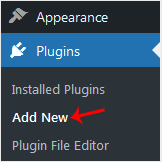
3. Click on Upload Plugin and then on Browse. Choose your plugin's zip file and click Install Now.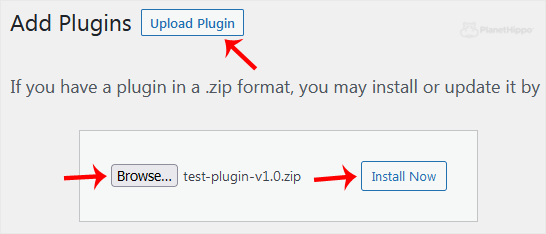
4. Click on Activate Plugin.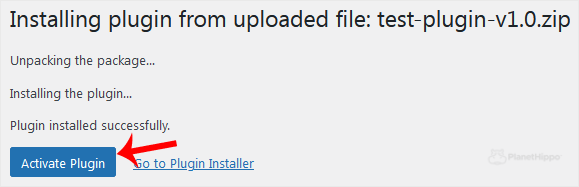
Note: After activating a plugin, a new menu of that plugin is added to the Dashboard menu.
- Home
-
Store
- Browse All
- Hippo Web Hosting Linux (New)
- Hippo WordPress Hosting (New)
- Hippo SSL Certificates (New)
- Hippo VPS Hosting
- Virtual Servers Windows
- Hippo Reseller Hosting
- SSL Certificates
- cPanel Web Hosting Linux
- Business cPanel Hosting
- WordPress Hosting
- Hippo Website Design
- Site Builder
- Digital Marketing
- Site Builder
- Register a New Domain
- Transfer Domains to Us
- Announcements
- Knowledgebase
- Network Status
- Affiliates
- Contact Us
-
More