PlanetHippo
  • 0 Shopping Cart
  • Home
  • Store
    • Browse All
    • Hippo Web Hosting Linux (New)
    • Hippo WordPress Hosting (New)
    • Hippo SSL Certificates (New)
    • Hippo VPS Hosting
    • SSL Certificates
    • Business cPanel Hosting
    • WordPress Hosting
    • Hippo Website Design
    • Site Builder
    • Digital Marketing
    • Site Builder
    • Register a New Domain
    • Transfer Domains to Us
  • Announcements
  • Knowledgebase
  • Network Status
  • Affiliates
  • Contact Us
  • More
  • Account
    • Login
    • Forgot Password?
  1. Portal Home
  2. Knowledgebase
  3. WordPress
  4. How to Delete Categories in WordPress

  Categories

DNS - Nameservers
6
Domain Transfer Issues
17
FTP
9
FTP Issues
24
Mail Clients
12
Mail Filters & SPAM
8
Mobile
11
Name Servers
5
Others
3
Outlook 2010 Issues
8
phpMyAdmin
12
SiteWorx/InterWorx
58
Softaculous
69
SSL
5
Updating DNS
17
WordPress
17

  Categories

  Tag Cloud

client email microsoft

  Support

My Support Tickets
Announcements
Knowledgebase
Downloads
Network Status
Open Ticket

How to Delete Categories in WordPress Print

  • 0

If you want to remove the WordPress category, then follow this instruction:


1. Log in to the WordPress dashboard.


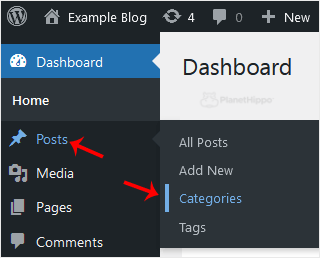
2. From the Dashboard menu, go to Posts and click on Categories.


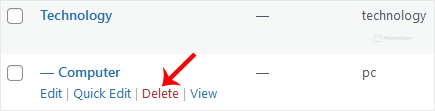
3. Hover your mouse over a category you want to remove and click on Delete. The confirmation option will appear. Confirm with OK.


Was this answer helpful?

Related Articles

How to Remove Sample Comments and Posts From WordPress You get sample comments and posts in a fresh WordPress install. You can easily remove them in the... How to Remove a Post in WordPress You can remove the published or draft post in WordPress.1. Log in to the WordPress dashboard. 2.... How to Bulk Delete Posts in WordPress It is possible to delete posts in bulk using WordPress. You can also delete selected posts in... How to Delete an Uncategorized Category in WordPress You cannot remove the Uncategorized category, but you can rename it.1. Log in to the WordPress... How to Delete a WordPress Theme You should remove unused themes. It is considered good practice to protect your WordPress website...
« Back

  Tag Cloud

client email microsoft

  Support

My Support Tickets
Announcements
Knowledgebase
Downloads
Network Status
Open Ticket
  • Contact Us
  • Terms of Service

Copyright © 2026 PlanetHippo. All Rights Reserved.


Loading...
Loading...

Generate Password

Please enter a number between 8 and 64 for the password length