Thunderbird is a friendly email client software for managing your email. You can set up a cPanel email account with Mozilla Thunderbird and receive/send the email.
1. Open Mozilla Thunderbird.

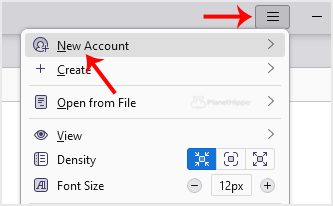
2. Click on the menu icon located on the right side of the screen and choose New Account. The drop-down menu will populate with new options.
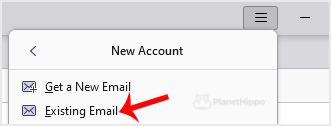
3. Click on Existing Email.
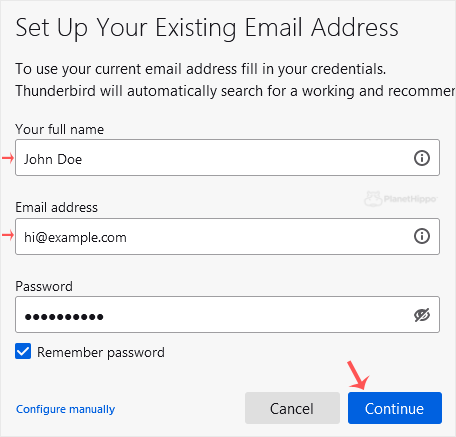
4. In the Mail Setup Account, fill out your name, full email address, and your email account password. Proceed with Continue.
5. It may take a few minutes to configure your email account. After that, click on Done.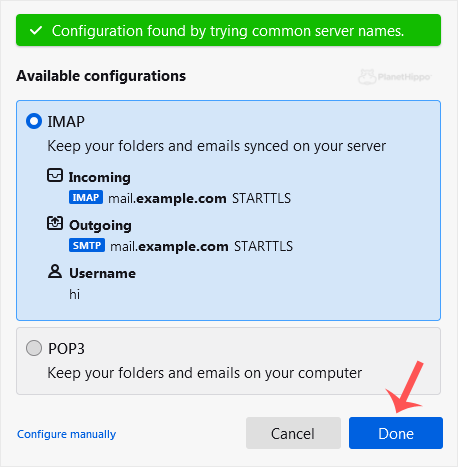
6. If it shows an SSL Security Exception, click on Confirm Security Exception and the warning will disappear.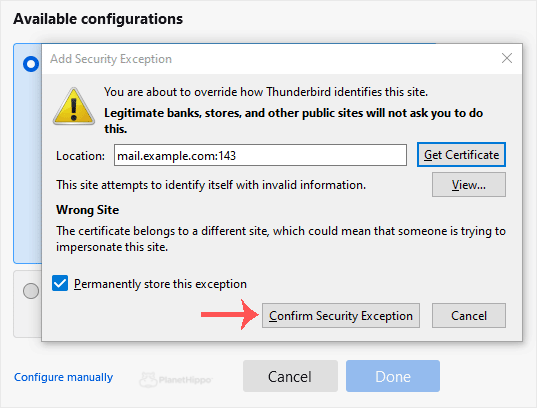
Congratulations, your email is set up successfully. You can now manage your email through Mozilla Thunderbird.
- Home
-
Store
- Browse All
- Hippo Web Hosting Linux (New)
- Hippo WordPress Hosting (New)
- Hippo SSL Certificates (New)
- Hippo VPS Hosting
- Virtual Servers Windows
- Hippo Reseller Hosting
- SSL Certificates
- cPanel Web Hosting Linux
- Business cPanel Hosting
- WordPress Hosting
- Hippo Website Design
- Site Builder
- Digital Marketing
- Site Builder
- Register a New Domain
- Transfer Domains to Us
- Announcements
- Knowledgebase
- Network Status
- Affiliates
- Contact Us
-
More