If you send an email via iOS, a signature will be automatically added in your reply, such as Sent from my iPhone. But do you know that you can customize this signature as well?
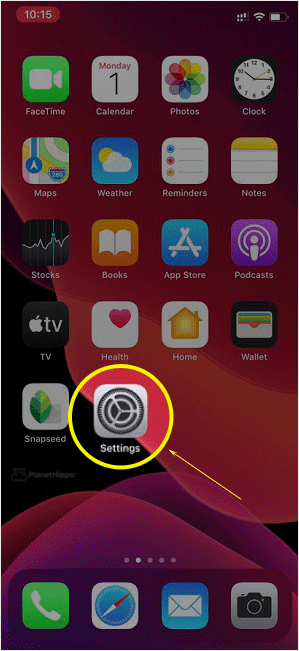
1. Open the main screen of your Apple Mobile and click on the Settings icon.
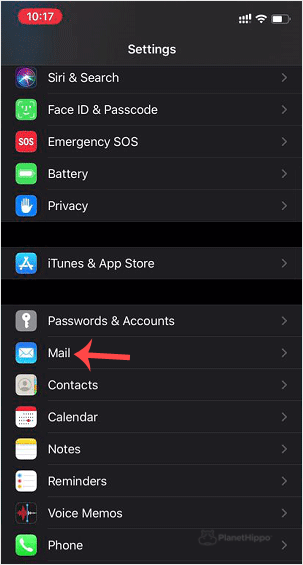
2. Scroll down and tap on Mail.
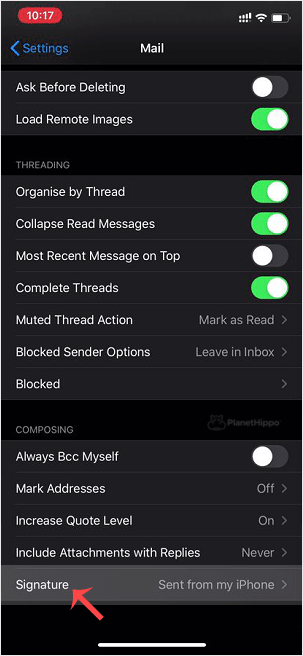
3. Now tap on Signature.
4. Customize your signature.
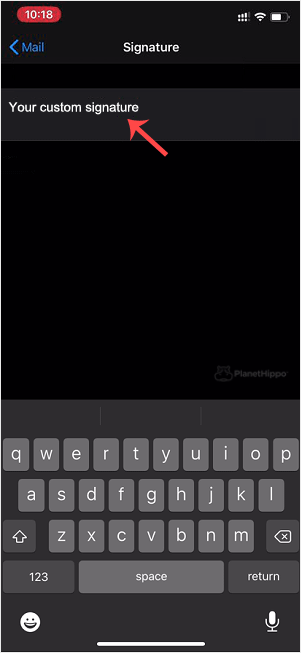
After changing it, your iOS will send your customized signature instead of the default signature.
- Home
-
Store
- Browse All
- Hippo Web Hosting Linux (New)
- Hippo WordPress Hosting (New)
- Hippo SSL Certificates (New)
- Hippo VPS Hosting
- Virtual Servers Windows
- Hippo Reseller Hosting
- SSL Certificates
- cPanel Web Hosting Linux
- Business cPanel Hosting
- WordPress Hosting
- Hippo Website Design
- Site Builder
- Digital Marketing
- Site Builder
- Register a New Domain
- Transfer Domains to Us
- Announcements
- Knowledgebase
- Network Status
- Affiliates
- Contact Us
-
More