1. Log in to your cPanel account.
2. In the Databases section, click on MySQL Databases.

3. In the New Database field, enter a name for the new database you wish to create.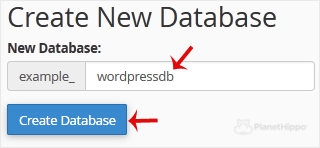
4. Click on Create Database.
- Home
-
Store
- Browse All
- Hippo Web Hosting Linux (New)
- Hippo WordPress Hosting (New)
- Hippo SSL Certificates (New)
- Hippo VPS Hosting
- Virtual Servers Windows
- Hippo Reseller Hosting
- SSL Certificates
- cPanel Web Hosting Linux
- Business cPanel Hosting
- WordPress Hosting
- Hippo Website Design
- Site Builder
- Digital Marketing
- Site Builder
- Register a New Domain
- Transfer Domains to Us
- Announcements
- Knowledgebase
- Network Status
- Affiliates
- Contact Us
-
More